This page will explain how to limit the use of obfuscated JavaScript to specific domains.
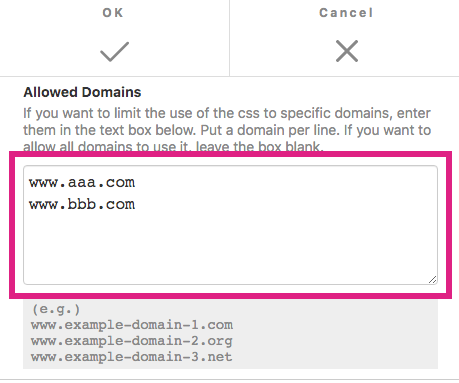
When you convert a CSS file to an obfuscated JavaScript file using CssHidex, you can specify domains in which the JavaScript is allowed to run. For example, if you specify www.aaa.com and www.bbb.com for the allowed domains, the obfuscated JavaScript file runs on www.aaa.com and www.bbb.com only. If the obfuscated JavaScript file is installed in any domains other than www.aaa.com and www.bbb.com, it will not run and so the CSS will not be effective as if it was never installed in the first place.
To specify allowed domains,
1 |
Log in to the CssHidex admin panel if you haven't already done so. |
2 |
Click the Allowed Domains pane (see below) to open the Allowed Domains dialog box. |

3 |
Enter the domains you want to allow in the Allowed Domains field. Put a domain per line. ( If you want to allow all domains, leave the box blank. ) |
4 |
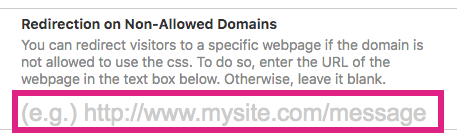
Optionally, you can specify the URL of the webpage that you want to redirect visitors to when the obfuscated JavaScript file is not installed in one of the allowed domains. If you want to redirect visitors to a webpage, enter the URL in the Redirection on Non-Allowed Domains field. If you don't, leave it blank. |
5 |
Click OK to save the changes. |

Now you have completed the settings of the allowed domains. From now on, every time you generate JavaScript by clicking Obfuscate, the settings will be applied to the JavaScript code.